

अगर आप photographer या, photo editor हो, images के साथ
seriously काम करते हो,
तो आपका असली सवाल simple है — DragGAN मेरे किस काम आएगा?
Bas wahi baat मैं यहाँ clear करने वाला हूँ।
मैं आपको hype नहीं दूँगा।
मैं आपको ये भी नहीं कहूँगा कि ये tool सब कुछ बदल देगा।
लेकिन ये जरूर बताऊँगा कि कहाँ DragGAN सच में useful लग सकता है, कहाँ आपका time बचा सकता है, और कहाँ अभी भी traditional editing tools की जरूरत पड़ती है।
Table of Contents
ये tool photographers aur editors ke liye interesting क्यों है?
क्योंकि real problem editing में हमेशा color ya brightness नहीं होती।
कई बार photo technically ठीक होती है, लेकिन feel थोड़ी miss कर जाती है।
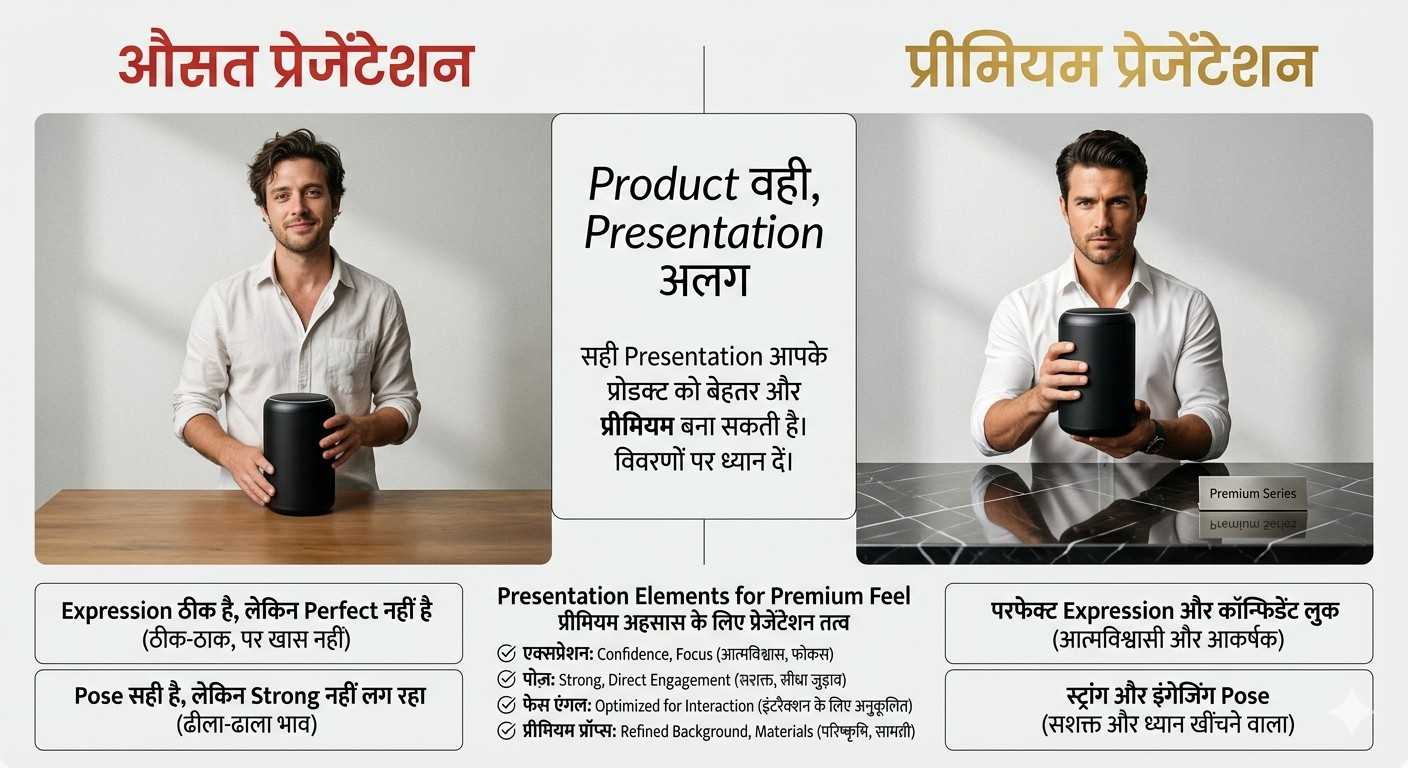
जैसे:
- expression ठीक है, लेकिन perfect नहीं है
- pose सही है, लेकिन strong नहीं लग रहा
- face angle थोड़ा off है
- product अच्छा है, लेकिन presentation उतनी premium नहीं लग रही
यहीं DragGAN जैसी चीज़ interesting लगती है।
मेरे हिसाब से इसका सबसे बड़ा फायदा final polish में नहीं, decision लेने के stage में है।
यानी final edit start करने से पहले आप जल्दी समझ सकते हो कि photo ko better direction में कैसे push करना है।
Photo editors ke liye DragGAN ka real फायदा क्या हो सकता है?
यही सबसे important part है।
Photo editor का आधा time actual edit में नहीं, बल्कि इस सोच में चला जाता है कि क्या बदलना चाहिए।
Aur कई बार गलत direction में edit शुरू कर दी, तो time double waste होता है।
DragGAN वहाँ useful हो सकता है जहाँ aapko image ke structure se related बदलाव test करने हों।
1. Face direction aur expression test करना
मान लो portrait अच्छा है, लेकिन face थोड़ा camera की तरफ होता तो shot stronger लगता।
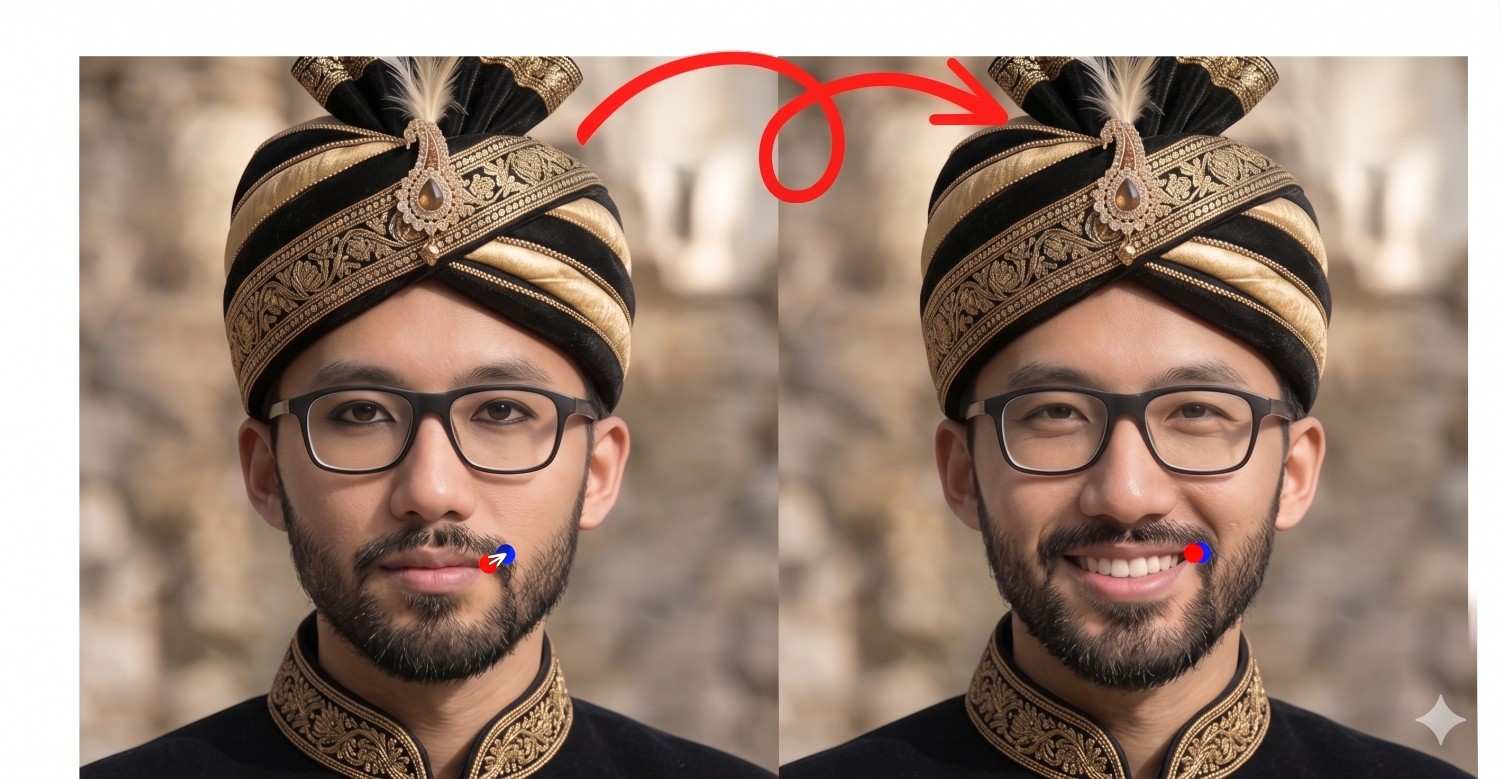
अब normal workflow में क्या होगा?
- warp
- liquify
- compare
- undo
- फिर दूसरा try
- फिर natural lag raha hai ya nahi, वो check
यानी simple दिखने वाला काम भी time खा जाता है।
DragGAN-type approach की value यही है कि आप जल्दी देख सको —
अगर चेहरा थोड़ा turn हो जाए तो shot improve होगा या नहीं।
यही चीज़ portrait editors के लिए useful है।
2. Smile aur mood correction ideas
Portrait editing में smile बहुत matter करती है।
कभी subject awkward smile देता है।
कभी neutral expression photo को flat बना देता है।
कभी image अच्छी होती है, लेकिन उसमें warmth नहीं आती।
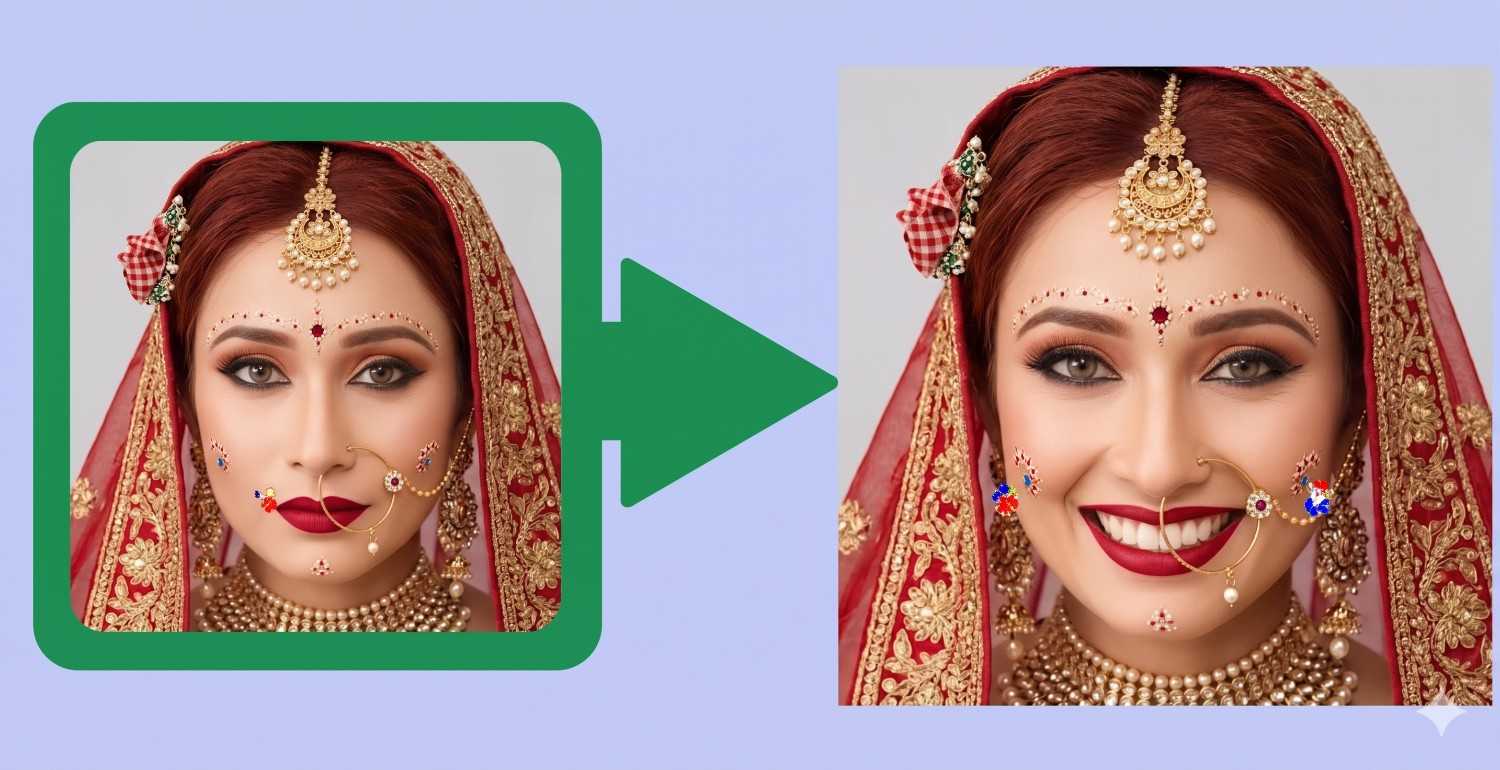
ऐसे case में editor जल्दी test कर सकता है कि:
- smile थोड़ी open हो तो better लगेगा?
- lips expression थोड़ा relax हो तो natural लगेगा?
- gaze soft हो तो image ज्यादा human लगेगी?
यानी final retouch से पहले direction साफ हो सकती है।
3. Pose correction ke idea
यहाँ बहुत लोग गलती करते हैं।
उन्हें लगता है editing सिर्फ skin smooth करने का नाम है।
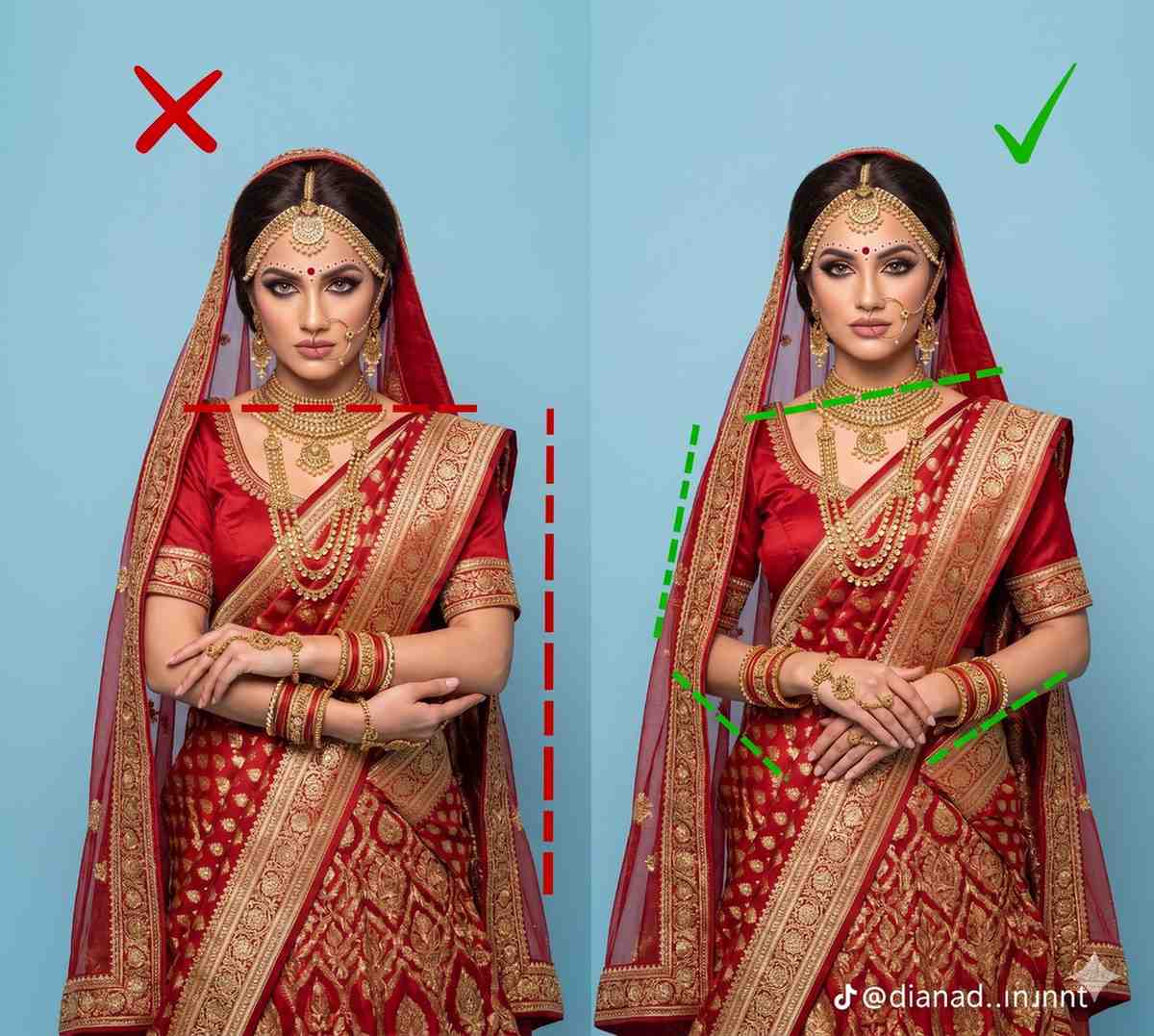
असल में strong photo और average photo के बीच फर्क कई बार pose बनाता है।
अगर:
- shoulder थोड़ा open हो
- neck position balance हो
- chin angle सही हो
- body twist थोड़ा improve हो
तो वही frame ज्यादा premium लगने लगता है।
DragGAN इस तरह की pose-thinking को fast कर सकता है।
DragGAN AI का इस्तेमाल कैसे करें? Step-by-Step समझो
Step 1: अपनी photo ready करो
सबसे पहले ऐसी image लो जिसमें subject साफ दिख रहा हो और जो हिस्सा बदलना है वो clearly visible हो। इससे आगे का काम easy हो जाता है।
Step 2: पहले clear करो कि change क्या चाहिए
सीधे editing शुरू मत करो। पहले decide करो कि तुम्हें क्या बदलना है।
जैसे face थोड़ा turn करना है, smile soft करनी है, chin ऊपर करनी है, या object का angle better करना है।
Step 3: image पर points set करो
अब उस हिस्से पर point लगाओ जिसे move करना है। फिर target तय करो कि उसे किस direction में ले जाना है। यही DragGAN का main control होता है।
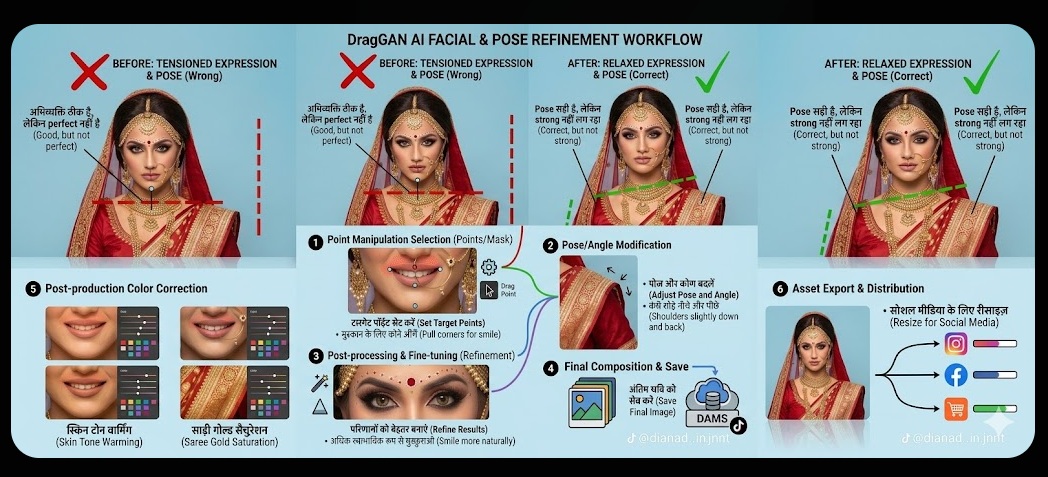
Step 4: process run करो और result देखो
अब बदलाव start करो और ध्यान से देखो कि image किस तरह बदल रही है। यहाँ सिर्फ change नहीं, natural feel भी important है।
Step 5: जरूरत हो तो फिर से adjust करो
अगर पहला result perfect न लगे, तो points दोबारा set करो और फिर try करो। थोड़ा adjust करके ही better output निकलता है।
Step 6: final result save करो
जब लगे कि image अब सही direction में आ गई है, तब उसे save कर लो। अगर final professional finish चाहिए, तो आगे की polish दूसरे editing tool में कर सकते हो।
Photographers ke liye ye कैसे time बचा सकता है?
Photographer के लिए सबसे frustrating चीज़ क्या होती है?
जब photo almost perfect हो… लेकिन पूरी तरह perfect न हो।
Shoot फिर से करना हर बार possible नहीं होता।
यही reason है कि photographers ke liye bhi ये tool interesting हो सकता है।
Portrait photographer ke liye
मान लो आपने 50 portraits shoot किए।
उनमें से कुछ shots बहुत अच्छे हैं, लेकिन:
- एक में face angle थोड़ा weak है
- दूसरे में chin थोड़ा नीचे है
- तीसरे में expression थोड़ा flat है
अब हर image पर heavy manual correction करना slow process है।
अगर कोई tool आपको जल्दी visual direction दे दे कि कौन-सा change काम करेगा, तो selection aur editing dono fast हो सकते हैं।
Wedding photographer ke liye
Moment गया तो गया।
अब सोचो:
Bride-groom ka portrait strong है, लेकिन
- groom थोड़ा camera की तरफ होता तो frame better लगता
- bride ki smile थोड़ी softer होती तो shot warm लगता
- pose थोड़ा open होता तो album photo और strong लगती
ऐसे cases में DragGAN final delivery tool नहीं, लेकिन correction-preview tool की तरह useful लग सकता है।
यानी आप जल्दी देख सकते हो कि image को किस direction mein improve करना है।
Product photography mein
अगर आप products shoot करते हो, तो आपको पता होगा angle ही game बदल देता है।
एक ही watch:
- थोड़ा tilt हो
- थोड़ा rotate हो
- थोड़ा front-facing हो
- थोड़ा side dramatic हो
तो पूरी presentation बदल जाती है।
ऐसे में DragGAN-type manipulation visual testing के लिए useful लग सकता है, खासकर जब आपको decide करना हो कि product किस angle में ज्यादा premium दिखेगा।
DragGAN ka सबसे बड़ा practical फायदा
मेरे हिसाब से इसका biggest benefit ये नहीं कि ये edit कर देता है।
इसका biggest benefit ये है कि ये aapko जल्दी सही visual direction सोचने में मदद कर सकता है।
और यही चीज़ real time बचाती है।
क्योंकि कई बार actual editing कम time लेती है,
गलत direction में editing शुरू करना ज़्यादा time लेता है।
अगर किसी tool की वजह से editor पहले ही समझ जाए कि:
- face turn useful है या नहीं
- pose change करना चाहिए या नहीं
- smile adjust करनी चाहिए या नहीं
- object angle improve होगा या नहीं
कहाँ ये tool genuinely useful लग सकता है?
ये खासकर useful लग सकता है जब:
- pose थोड़ा weak हो
- face direction off हो
- expression flat हो
- framing में subject structure stronger चाहिए हो
- client ko quickly multiple directions दिखानी हों
- final edit से पहले visual experimentation करना हो
यानी जहाँ structure matter करता है, वहाँ यह interesting tool बन सकता है।
कहाँ ये उतना useful नहीं रहेगा?
ये समझना भी उतना ही जरूरी है।
अगर आपकी problem ये है:
- image blur है
- light खराब है
- skin cleanup चाहिए
- background remove करना है
- masking करनी है
- text add करना है
- proper final retouch चाहिए
- client delivery-ready output चाहिए
तो वहाँ traditional editors अभी भी ज्यादा practical हैं।
READ MORE:Halku AI Video Ideas: Viral Desi Shorts बनाने के लिए सबसे मजेदार और दमदार आइडियाज़
इसे use करते समय लोग कौन-सी common mistakes करते हैं?
1. इसे magic button समझ लेना
बहुत लोग AI tool देखते ही सोचते हैं — बस upload करो और perfect result मिल जाएगा।
Reality ऐसी नहीं है।
Tool तभी useful है जब आपको clearly पता हो कि change क्या चाहिए।
2. Final edit aur preview में फर्क न समझना
Rough visual direction और polished final output दो अलग चीज़ें हैं।
DragGAN-type result idea दे सकता है, लेकिन client-ready final work के लिए polishing अब भी जरूरी है।
3. Editing fundamentals भूल जाना
अगर photo की base ही weak है, तो tool miracle नहीं करेगा।
Lighting, composition, timing, expression — ये basics अब भी matter करते हैं।
4. Har image par same expectation रखना
कुछ photos में concept शानदार लगेगा।
कुछ में result उतना convincing नहीं लगेगा।
इसलिए smart use ज़रूरी है, blind trust नहीं।
इसे practically कैसे approach करना चाहिए?
अगर आप photographer ya editor हो, तो simple flow यही होना चाहिए:
Step 1: पहले problem पहचानो
देखो issue कहाँ है।
- color?
- light?
- blur?
- ya pose / expression / angle?
अगर issue structural है, तभी DragGAN-type approach relevant है।
Step 2: change ko clearly define करो
Random मत सोचो।
Specific सोचो:
- चेहरा थोड़ा right चाहिए
- smile थोड़ी soft चाहिए
- chin थोड़ा ऊपर चाहिए
- product angle थोड़ा premium feel देना चाहिए
Step 3: पहले rough direction test करो
सीधे final नहीं बनाना।
पहले सिर्फ ये देखो कि change अच्छा लग भी रहा है या नहीं।
Step 4: final polish traditional editor में करो
यही practical workflow है।
Visual experimentation एक जगह
Final cleanup दूसरी जगह
यही professional approach है।
मेरा honest observation
असल value ये है कि यह photo editor aur photographer को जल्दी सोचने, test करने aur compare करने का नया तरीका दे सकता है।
और ये छोटी बात नहीं है।
Creative work में speed सिर्फ keyboard shortcuts से नहीं आती।
Speed तब आती है जब aap जल्दी सही decision लेते हो।
अगर कोई tool decision fast कर दे,
तो वो indirectly editing bhi fast कर देता है।

नमस्ते दोस्तों, मैं आकाश हूँ, AI With Me का founder।
AI With Me एक technology blog है, जहाँ मैं Artificial Intelligence, AI tools, online earning ideas, digital marketing, blogging tips और latest tech updates को आसान भाषा में समझाने की कोशिश करता हूँ।
मेरा मकसद simple है — tech और AI से जुड़ी जानकारी को इतना आसान बनाना कि beginner भी उसे समझ सके और अपने काम, study, content creation या online growth में सही तरीके से use कर सके।
Saw an ad for 55win33, sounds pretty tempting. Anyone played there before? Let me know if it’s worth it! Considering check out 55win33. Thanks guys!